


• Welcome to MacanEVowners! If you're joining us from Taycanforum.com, then you may already have an account here.

    If you were registered on Taycanforum as of January 24, 2024 or earlier, then you can simply login here with the same username and password

    If you wish, you can remove your account here.
Sponsored

Apple CarPlay connectivity

iainb

Macan 4S
Member
First Name
Iain
Joined
Dec 26, 2024
Threads
3
Messages
14
Reaction score
6
Location
Rhode Island
Vehicles
Macan 4S
Country flag
i have this strange thing happen every now and then (enough to be pretty annoying!) where Apple CarPlay suddenly stops working and a few minutes later i get the attached message on my iPhone. Seems like the phone is trying to connect to the internet through the car, which obviously isn’t a great idea. The car seems to have two WiFi addresses - one with 5GHz on the end and one without. Has anyone else have this issue? And do folks use the WiFi address with 5GHz or without. I frequently use the same iPhone with our other cars using CarPlay and this never happens, so it must be something specific to the Macan.

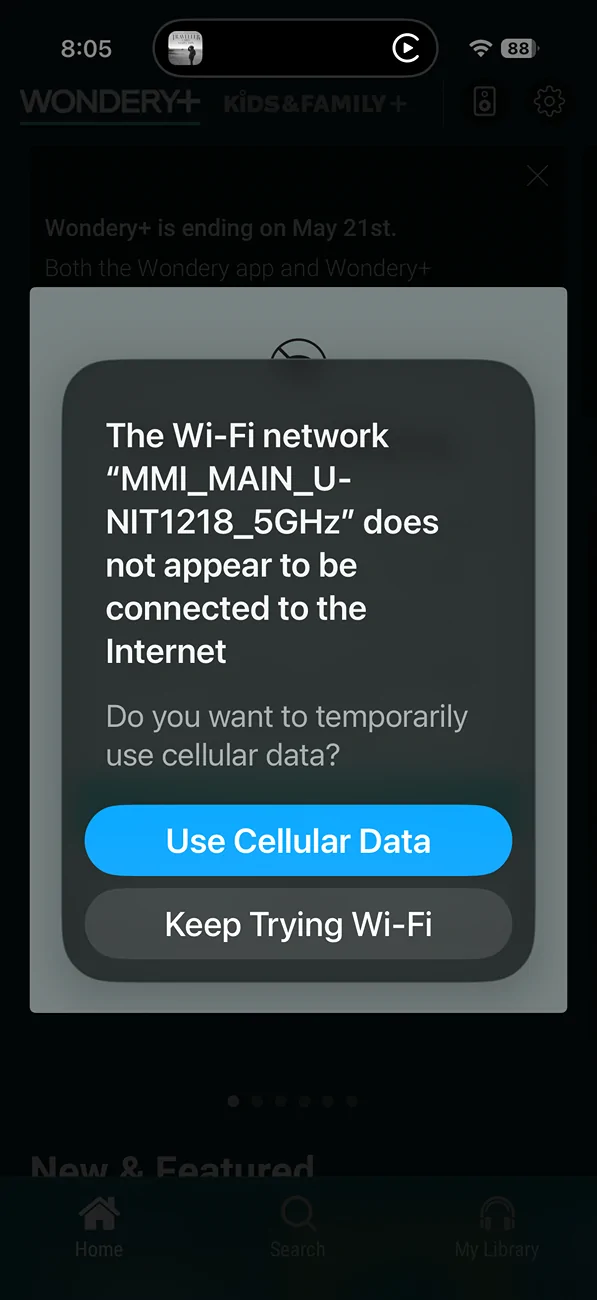
Electric Macan EV Apple CarPlay connectivity IMG_0917
Sponsored


alxman

Macan 4S
Well-Known Member
Joined
Oct 31, 2024
Threads
14
Messages
484
Reaction score
507
Location
Atlanta
Vehicles
Macan 4S EV, BMW X6, Tesla MX, Tesla M3
Country flag
Seeing that "MMI_MAIN_UNIT" message in your electric Macan can be annoying, especially when you're just trying to get your tech to cooperate. Essentially, your phone has connected to the **car's internal Wi-Fi hotspot**, but that hotspot doesn't currently have an active internet path to share.
Here is why this happens and how to fix it:

1. The "Wireless CarPlay/Android Auto" Loop
Most of the time, this isn't a "failure" but a side effect of how wireless smartphone integration works.
The Cause: To run Wireless CarPlay or Android Auto, your phone creates a private Wi-Fi link with the Porsche Communication Management (PCM) system.
The Glitch: Your phone sees this Wi-Fi network and thinks, "Great, I'll use this for internet!" but the car isn't actually broadcasting a web connection. Your phone then gets confused because it’s "connected" to Wi-Fi but can't load Google Maps or Spotify.
The Fix: Select "Use Cellular Data" on your phone. This tells your phone to keep the Wi-Fi link active for the car's screen but continue using your phone's 5G/LTE for the actual internet data.

2. Inactive "Data Pass" or Porsche Connect
If you are specifically trying to use the car's built-in Wi-Fi for other devices (like a passenger's iPad), the car needs its own data plan.
*Check Subscription: Even if the car is brand new, the Porsche Data Pass (often provided through carriers like Verizon or AT&T depending on your region) must be activated via the My Porsche app.
*Trial Period: If your trial has ended or the "Connect Services" toggle is off in the PCM privacy settings, the hotspot will broadcast a signal but won't provide internet.

3. The "Home Wi-Fi" Conflict
The Macan EV is known to get a bit "sticky" with Wi-Fi.
*If your car is parked in your garage and connected to your home Wi-Fi, it sometimes refuses to hand over the connection to your phone for CarPlay until you drive far enough away for the home signal to drop
*Quick Fix: If it happens in your driveway, try toggling your phone's Wi-Fi off and back on once you're down the street.
*Or, try connecting the car to the house Guest Wi-Fi instead of the main Wi-Fi.

Quick Troubleshooting Steps:

1. Privacy Settings: In your PCM, go to Settings > Privacy and ensure "Connect Services" is toggled ON.

2. PCM Reboot: If the message persists and nothing is working, press and hold the volume knob/roller for about 10–15 seconds to force a reboot of the infotainment system.

3. Check Data Balance: Open the My Porsche app, go to Vehicle Details, and tap Data Pass to see if you have an active data allowance.

If you aren't paying for a separate data plan for the car, you can safely ignore the "MMI" network in your phone's Wi-Fi settings—CarPlay will handle that connection in the background automatically!


Top